A self-contained HF software-defined radio in a Hammond
instrument case: a Raspberry Pi 4 already on the shelf, a RadioBerry V2
Beta5 HAT, a 4.3 inch touchscreen, and a real weighted VFO knob because
a radio you tune with a mouse is not a radio you want in the field.
Three to five watts out, an internal battery, and a relay-selected
harmonic filter bank.
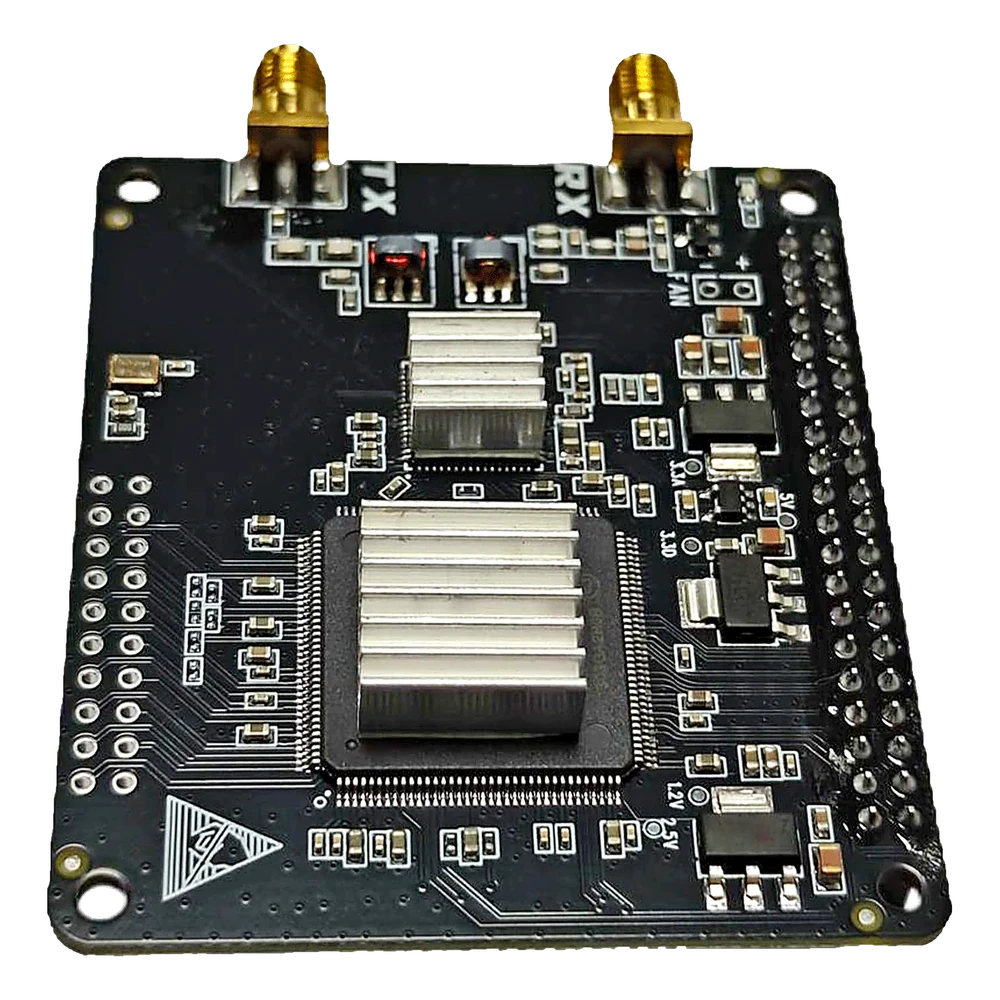
The RadioBerry V2 Beta5 HAT itself. Both heatsinks are
fitted, the SMA jacks are TX on the left and RX on the right, and the
40-pin header down the right-hand edge is what mates it to the Pi.
Output
About 3 to 5 W
Enclosure
Hammond 1458VG4, vented steel, 10 x 8 x 4 in
Brains
Raspberry Pi 4, piHPSDR
Front end
RadioBerry V2, AD9866 12-bit
Battery
12.8 V 6 Ah LiFePO4, internal
Remaining cost
About $900, hold $1,000
Correction
The PA runs on 8.4 V, not 12 V. An earlier plan called
for a 12 V PA regulator. That is wrong for this exact AURSINC board,
whose listing allows roughly 6 to 8 V and recommends 8.4 V. Use a
regulated 8.4 V rail, such as the Pololu D42V55F8. Do not put 12 to
13.8 V into it.
What it looks like from the operator's chair
Front panel
Display centered VFO to the right
Microphone, headphones and the CW key go on the lower edge or
the rear panel depending on how the mechanical clearances land.
Antenna, DC input, charge jack, USB service port, ground stud and the
cooling exhaust all live on the back.
The battery, the Pi and RadioBerry stack, the PA, the
filter board and the power electronics make this tight. Verify every
position with full-size paper templates before drilling anything.
Reserve about 135 x 90 mm for the filter board once SMA connectors,
coax bends and mounting clearance are allowed for.
How the signal and the power move
System architecture
Transmit runs left to right: RadioBerry, PA, filter bank, SWR
bridge, antenna. Receive comes back the other way through the same
filter bank and past the PA. The RP2040 carries the front panel in over
USB and also sets the filter bank, holding transmit inhibited while the
relays move.
The three parts that decide the build
Key modules
RadioBerry V2
Perpetual beta
AURSINC or PA3GSB-compatible, preferably with the Cyclone 10LP
10CL025 FPGA. A direct-conversion SDR transceiver HAT for the Pi 4.
Published
AD9866 12-bit mixed-signal front end
Maximum receive bandwidth about 384 kHz
Bare transmit output about 10 dBm
Planning price $159.99
Watch for
Confirm the exact FPGA marking before loading gateware
Software images, gateware and GPIO behavior all need validating before permanent integration
Sold as the AURSINC RadioBerry Preamp Board V2, which
is a misleading name: it is a transmit power amplifier and receive
routing board, not a receive preamplifier.
Published
1 to 50 MHz, about 3 to 5 W out
SMA RF connections, SSB, AM and FM
Recommended supply 8.4 V, allowed roughly 6 to 8 V
Includes three SMA jumpers, stacking hardware, power lead
Listed at $78.99
Availability
AURSINC showed sold out during this research
Amazon showed the GOOZEEZOO version with no featured offer
A Newegg listing at about $131.99 carried contradictory compatibility information and is not recommended
Ask AURSINC directly for the 3 to 5 W, 6 to 8.4 V version
If it stays unavailable
About 10 dBm drive sensitivity
Linear 1 to 30 MHz, 3 to 5 W out
Hardware TX enable or bias control
RX bypass or external T/R switching
Stable into 50 ohms, adequately cooled
A substitute needs a separate T/R relay, sequenced PA
enable, and confirmed compatibility with RadioBerry TX/RX timing. Do
not pick one by advertised wattage. Do not pay the inflated Newegg
price without written confirmation of Pi 4 and Beta5 compatibility.
The $80 filter bank
Settled
An assembled seven-position low-pass filter board, bought off eBay. It
is the transmit harmonic filter and nothing else. It does not replace
the PA.
At the worst stated 0.5 dB, 5 W in gives about
4.46 W out:
5 W × 10(−0.5/10) ≈ 4.46 W
It replaces the previously planned QRP Labs relay
board, six individual filter modules, the relay driver assembly and
all the interconnect wiring.
Before wiring
Get the seller's exact three-bit truth table
Do not assume the binary code order
Establish a safe default filter
Inhibit transmit while switching
Which filter for which band
Filter allocation
LPF cutoff
Amateur bands
2.5 MHz
160 m
5 MHz
80 m
8.6 MHz
60 and 40 m
15.5 MHz
30 and 20 m
25 MHz
17 and 15 m
35 MHz
12 and 10 m
55 MHz
6 m, normally unused on this build
Firmware rules for the filter bank
Map the operating frequency to the right cutoff.
Use the seller's truth table exactly.
Disable PA bias and PTT before changing the relay address.
Let the relays settle before enabling RF drive.
If the software state is uncertain, select the next safer lower-frequency filter.
Inhibit transmit if the requested band has no valid filter.
Store the last valid filter state only if power-up stays safe.
The real VFO question
A knob, not a mouse
This design has a physical VFO. It needs no Si5351 or
analog oscillator: the frequency synthesis lives inside the
RadioBerry and the SDR software. The knob is an encoder that sends
tuning commands to piHPSDR.
Bourns ENC1J-D28-L00128L optical quadrature encoder, 128 pulses per revolution, $54.50
A weighted 38 to 45 mm knob
A separate momentary VFO-select button, because the optical encoder has no push switch
Adafruit KB2040 RP2040 USB controller, $8.95
74LVC14A Schmitt trigger for clean encoder edges
Short shielded USB-C to USB-A cable to the Pi
Three cheaper Bourns PEC11R encoders with integrated
push switches handle AF gain, RF gain and the multifunction control.
The RP2040 has enough I/O for the VFO, the encoders, the soft keys,
the status outputs and the three filter address lines.
Everything, grouped
Purchasing list
One radio Pi already owned
Computer, SDR and display
1 Raspberry Pi 4 Model B already owned
1 RadioBerry V2 Beta5 HAT, preferably 10CL025
1 2x20 long-pin stacking header, if the final stack needs it
1 64 GB high-endurance A2 microSD card
1 RadioBerry-compatible 3 to 5 W PA board, or an approved substitute
1 RadioBerry heatsink set
1 Waveshare 4.3 in DSI capacitive touchscreen, 480x800, such as the 4.3-DSI-TOUCH-A / SKU 34353
1 Short 15-pin DSI ribbon cable for the Pi 4
1 Custom display bezel
1 About 1 mm closed-cell neoprene display gasket
VFO and front-panel controls
1 Bourns ENC1J-D28-L00128L optical encoder
1 38 to 45 mm tuning knob with the right shaft bore
1 Momentary VFO-select pushbutton
1 Adafruit KB2040 RP2040 USB controller
3 Bourns PEC11R-4215F-S0024 encoders with push switches
3 18 to 22 mm secondary knobs
5 Momentary soft-key switches, and 5 matching caps
1 74LVC14A Schmitt-trigger buffer
10 10 kΩ 1% pull-up resistors
10 100 nF X7R debounce and bypass capacitors
1 Short shielded USB-C to USB-A cable
1 Custom front-panel control PCB
RF path and filtering
1 Seven-position 20 W LPF board, 120 x 75 mm
1 Bidirectional 5 to 10 W HF SWR bridge PCB
2 FT50-43 transformer cores for the bridge
2 BAT54S detector diodes
1 ADS1115 four-channel I2C ADC module
1 50 Ω BNC female chassis connector, such as the Amphenol 31-221-RFX
1 About 1 m RG-316/U internal coax
6 SMA male connectors for RG-316, for three short assemblies
1 Optional broadcast-band high-pass filter for strong AM environments
1 Optional second receive-only antenna connector
Audio, microphone, PTT and keying
1 USB audio adapter with stereo out and mic in, Adafruit 1475 or a good CM108
1 Low-EMI class-AB speaker amplifier, such as an LM4865M on a custom PCB
1 Custom microphone, PTT and audio PCB
1 LTV-817 or equivalent PTT optocoupler
2 Optional 600:600 Ω audio isolation transformers, only if testing shows they are needed
About 2 m shielded twisted pair for microphone and audio
Power and battery
1 Bioenno BLF-1206A 12.8 V 6 Ah LiFePO4 with internal protection, $79.99
1 Bioenno BPC-1502DC 14.6 V 2 A LiFePO4 charger
1 Anderson Powerpole PP15/30 external input panel mount
1 5.5 x 2.1 mm center-positive charging jack, verified against the actual charger plug
1 EXT-OFF-BAT DPDT source selector, 10 A DC minimum
2 Inline ATO/ATC fuse holders, 4 5 A fuses, two fitted and two spare
1 SMBJ18A unidirectional TVS diode
1 IRF4905 or lower-resistance P-channel reverse-polarity MOSFET
1 Pololu D42V55F5 5 V 6 A regulator
1 Pololu D42V55F8 8.4 V regulator for the PA, $31.95
2 5 A minimum low-DCR DC common-mode chokes
4 470 µF 25 V low-ESR electrolytics, 6 1 µF 50 V X7R, 10 100 nF 50 V X7R
4 3 to 6 A ferrite beads with useful impedance at 100 MHz
1 Custom fused power distribution PCB
1 Aluminum battery strap with neoprene pad
About 2 m each red and black 16 AWG, and 3 m each 20 to 22 AWG
Enclosure, cooling and shielding
1 Hammond 1458VG4 vented instrument enclosure, black vented steel shell with removable aluminum front and rear panels, Mouser 546-1458VG4, $79.75
1 Spare front panel, or custom 0.064 in aluminum prototype panel
1 Internal 1 to 1.5 mm aluminum RF partition
1 Bonded tinplate or aluminum shield cover for the DC/DC section
1 Noctua NF-A4x10 5 V or equivalent 40 x 10 mm low-noise fan, plus guard and filter
1 Low-profile Pi heatsink that clears the RadioBerry stack
About 0.5 m of 10 to 15 mm copper grounding braid
1 Roll of 25 mm conductive copper foil tape
1 External 1/4-20 ground stud set with wing nut
M2.5 and M3 standoff, screw and star-washer assortments
Cable tie, adhesive mount and heat-shrink assortments
Connectors, wiring and finishing
1 Shielded panel USB-A extension for service use
1 Optional shielded RJ45 panel feedthrough
1 JST-XH housing, header and crimp assortment
1 Mix 31 clamp-on and sleeve ferrite assortment
1 24 to 26 AWG stranded hookup wire assortment
1 Status LED set: green power, red TX, amber fault, plus 3 1 kΩ resistors
1 Engraved, UV-printed or laminated panel label set
Optional upgrades
GNSS receiver with PPS and matching active antenna
DS3231 real-time clock module
Folding carrying handle
Second receive or transverter SMA connector
Separate RX antenna input
Two rails, one selector
Power architecture
Either the internal 12.8 V LiFePO4 or an external
13.8 V supply, chosen by a manual EXT-OFF-BAT switch. Manual
selection stops the battery and the supply backfeeding each other.
Each source gets its own fuse. The selected source passes through
reverse-polarity and transient protection, then splits into a
filtered 5 V rail for the Pi, display, RadioBerry logic, RP2040,
filter relays and audio, and a filtered 8.4 V rail for the PA alone.
Battery
Charging comes only from the dedicated 14.6 V LiFePO4 charger, with
the radio switched off in the initial design. Do not use an
ordinary lead-acid or lithium-ion charger.
Keeping the noise out of the receiver
RF and EMI practice
Layout
Short RG-316 for every internal RF connection.
Keep the PA, filter bank and SWR bridge together in the RF section.
Bond the antenna connector directly to the metal rear panel.
Aluminum partition between the RF section and the Pi, display and DC/DC section.
Bonded shield cover over the switching regulators.
Wiring
Keep DSI, USB, fan and audio wiring away from the PA input and the RadioBerry RX nodes.
Ferrites on DSI, USB, fan and power leads where testing shows common-mode noise.
One intentional chassis and RF ground strategy, not random multiple audio grounds.
Sense PTT through an optocoupler or a similarly protected input, and keep the hardware TX-inhibit line independent of software where practical.
Star washers or other gas-tight bonding on painted panels.
Cooling
Temperature-control the fan if practical.
Ensure continuous cooling for extended digital transmission.
Forced air and verified bias for prolonged duty cycles.
The listing mentions about 2.4 to 2.5 V bias for extended continuous transmit, but the actual board documentation governs.
What is left to spend
Cost
Excludes antenna, feed line, labor and premium cosmetic machining
Build level
Expected, before tax and shipping
Complete radio with internal battery and the $80 filter bank
$805 to $955
Radio without the internal battery and charger
$680 to $800
Recommended working cash allowance after shipping and tax
About $1,000
Major contributor
Approximate
RadioBerry V2
$159.99
AURSINC 3 to 5 W PA, if available
$78.99
Hammond enclosure
$79.75
Assembled LPF bank
$80.00
4.3 in display and mounting
$50 to $75
Optical VFO and controller
$75 to $100
Battery and charger
$105 to $120
Remaining controls, audio, power, PCBs, wiring and hardware
About $175 to $260
Custom PCBs bought at minimum quantities, and shipping
from several suppliers, are the largest variables.
Order of operations
Buy, then build, then test
Purchase order
RadioBerry V2 Beta5, FPGA version confirmed.
The PA, because availability is the biggest risk.
The $80 filter board.
The 4.3 in display.
The enclosure, only after full-size templates confirm the layout.
Sweep and confirm the filter for every supported band.
Measure harmonics and spurious output with proper attenuation.
Calibrate the forward and reflected detectors.
Test microphone, PTT, speaker, headphones, CW keying.
Thermal testing at the real voice and digital duty cycles.
Repeat receiver noise testing with display, fan and DC/DC running.
Only then, an antenna.
Commissioning equipment
Owned Excluded from the project cost.
Current-limited 0 to 15 V, 5 A or larger bench supply.
Digital multimeter.
50 Ω dummy load, 20 W continuous or better.
Accurate low-power HF wattmeter.
VNA covering HF to at least 100 MHz.
Spectrum analyzer to at least 200 MHz.
3, 6, 10 and 20 dB attenuators with adequate power ratings.
Never connect the transmitter to an antenna until PA
stability, filter selection and harmonic performance have been confirmed
into a dummy load.
Where it stands
Decided, and still open
Decided
RadioBerry V2 Beta5 rather than Hermes, to hold the cost down
The Raspberry Pi 4 already owned
A 4.3 in DSI touchscreen
The Hammond 1458VG4
A physical optical-encoder VFO
An RP2040 USB controller for the front panel
The $80 assembled seven-position filter board
An internal 6 Ah LiFePO4, if it fits mechanically
An 8.4 V rail for this exact PA
Still to confirm
PA availability and exact Beta5 compatibility
The exact RadioBerry FPGA and its gateware
PA connector and enable/bias pin assignments
The filter three-bit truth table and power-up default
Final display mechanical drawing and bezel cutout
Internal placement and battery clearance
Final microphone connector pinout
SWR bridge design and calibration constants
piHPSDR front-panel and HID command mapping
Whether 6 m is supported well enough to justify wiring the 55 MHz filter position
Where this lands
Bottom line
The $80 filter board is electrically well suited and is a cleaner
answer than assembling the earlier QRP Labs filter system. The
RadioBerry stays the exciter and receiver, a separate AURSINC-style
board supplies the 3 to 5 W, and the filter bank removes transmit
harmonics before the SWR bridge and the antenna.
The blocker is PA availability, not the filter board. Do not
substitute an arbitrary HF amplifier until drive level, linearity, T/R
switching and bias sequencing have all been verified.
With the Pi and the test equipment already on hand,
plan on roughly $900 for the remaining parts and keep $1,000 available
to absorb shipping, tax, PCB minimum quantities and small hardware.
The microphone connector uses a project-specific pinout: label it
clearly and do not imply compatibility with Icom, Yaesu, Kenwood or
military handset wiring without an adapter.